Under The Wire

Under The Wire
Showing posts with label news. Show all posts

Wednesday, October 21, 2009

Facebook Lite: new Facebook’s interface

Today talk about new Facebook version: Facebook Lite.

lite2

lite1

Starting from Facebook Mobile experience, the developers are projecting new easier interface. New version is very simple and clear, there aren’t unnecessary bars and it is very fast to load also by slow connections.

In fact, this version is thinking in order to new users from developing country and to mobile devices (iPhone, Smartphone,…) that use slow connections.

However, this new version has all necessary functions:

  • Post videos and photos
  • Show videos and photos
  • Write comments
  • Like feature
  • Management profile info and friends
  • Wall
  • …

This version is only a test interface, but probably it is a preview of next Facebook graphic.

Bye


Read more...

Friday, February 27, 2009

Gmail secret features: how use them.

post1

Recently, Google update Gmail, but many features are hide and many people don’t know them.
Before to active secret features, it’s necessary set as default language English (US):

Capture

  1. Settings-> General –> Language-> Gmail display language:  English(US)
  2. Save Changes

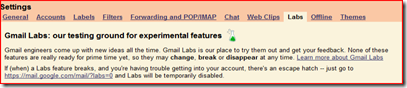
Well, now it’s possible enable new Gmail features: a new tab “Lab” is appeared in setting page:
Capture3

  This tab contains many interesting demo features, but they are stable and not cause problem. There are many features, but I want appear 4 of this:

  1. Offline mode
  2. Navbar drag and drop
  3. Multiple Inboxes
  4. Google Docs gadget

Offline mode is very useful feature which permits to use Gmail and view mail without Internet connection. When this feature is enable, Offline0.2 button appears on top of page: you can active offline mode clicking on it. First time that you use offline mode, a plug-in will be downloaded and installed.

Navbar drag and drop feature is useful to personalize Gmail page, in fact, when this feature is active, allows you to reorder the items in your navbar using drag and drop. When your page satisfies you, disable features.

Multiple Inboxes feature allows to view more list of mail at the same time. It’s possible define rules to automatically choice what view in any box. Normally, I use Gmail to view many mailboxes, but most important of these is visualized in a separated box in top of page.

Google Docs gadget features shows a box with all your Google Docs. This features is most useful for those that use many time Google doc.

There are many other features that normally I don’t use, but any person has different needs. If you want use other features, write a comment to this post.

Bye.


Read more...

Saturday, January 24, 2009

Windows 7: battery management

Many people, and also I, attended Windows 7 because Microsoft promised very good usability also with netbook. In my opinion, a lot of user expectations are realized by last public beta of Windows 7, but THIS IS ONLY A BETA VERSION and many work will do before the final version.

I’m trying Windows 7 on my EeePc 1000H and a good surprise of new OS is the battery management. Before of Windows 7 I used Windows Xp on my netbook and the best work-time was 5h and 5 min. With the new OS,  it increases to 6h and 51 min. 2

These times (on Xp and on Windows 7) are obtained by this setting:

  • Minimal brightness
  • Wireless off
  • Bluetooth off
  • 10 minutes after start
  • Windows setting: power saver

The power saver setting disables Aero, if you enable it the time is not very different: 5h and 50 min.

con2

Naturally this times decrease with a intensive work, however, they are very interesting: in fact the normal activity on this kind of pc is read or write a text file. One supplementary battery’s hour is very useful specially on travel when is not possible recharge the battery.

Read  also other posts that talk about Windows 7.

Bye.


Read more...

  © Blogger template 'Minimalist E' by Ourblogtemplates.com 2008

Back to TOP