Under The Wire

Under The Wire
Showing posts with label iPhone. Show all posts

Tuesday, January 17, 2012

Cannot connect to iTunes Store: THE SOLUTION

Sometimes you cannot install/update apps anymore and you get the error "Cannot connect to iTunes Store". There's a very simple solution for to this annoying problem.
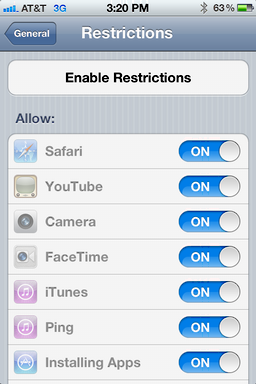
Go to Settings > General > Restrictions.
Enable restrictions. Wait 5 seconds. Disable restrictions.
It should now work!
If this doesn't work those are other things you should try.
Alternative #1
Reset your network settings
Go to Settings > General > Reset > Reset Network Settings
and then restart your device.
Alternative #2
Go to Settings > Wifi > {YourWiFiNetwork}
Press on the blue arrow and choose Forget this Network
Restart your device and retry.
Alternative #3
Uninstall and then reinstall iBooks.
Alternative #4
Make sure date and time are correct.
Go to Settings > General > Date & Time.
If the option exists, turn off Set Automatically.
Verify the time zone and time are correct. If not, adjust them.
If everything was correct and the option exists, turn on Set Automatically.
Alternative #5
If your device is jailbroken delete the file /private/var/mobile/Library/Caches/com.apple.mobile.installation.plist
And then restart your device.


Read more...

Wednesday, January 27, 2010

Live coverage of Apple Keynote 2010

Click here to get live coverage of the event!


Read more...

Sunday, January 24, 2010

January 27th, Apple Keynote 2010 live on Under the Wire!!!

Apple is preparing a event in San Francisco on January 27th at 10 AM Pacific Time(GMT-8).

top

Last rumors talk about iPhone OS 4.0 and iLife 2010, but all are attending the "latest creation". Probably, this last creation will be iSlate, the long-rumored Tablet.

Under the Wire going to commentate live on all event and in particular Steve Jobs keynote.

Click here to get live coverage of the event!


Read more...

Wednesday, October 21, 2009

Facebook Lite: new Facebook’s interface

Today talk about new Facebook version: Facebook Lite.

lite2

lite1

Starting from Facebook Mobile experience, the developers are projecting new easier interface. New version is very simple and clear, there aren’t unnecessary bars and it is very fast to load also by slow connections.

In fact, this version is thinking in order to new users from developing country and to mobile devices (iPhone, Smartphone,…) that use slow connections.

However, this new version has all necessary functions:

  • Post videos and photos
  • Show videos and photos
  • Write comments
  • Like feature
  • Management profile info and friends
  • Wall
  • …

This version is only a test interface, but probably it is a preview of next Facebook graphic.

Bye


Read more...

Saturday, February 28, 2009

Megavideo Unlimited: Download videos from Megavideo(Update2009)

[UPDATE: 19 April 2009] Check this new post to read the latest Megavideo tricks.

[UPDATE: 19 September 2009] Check this new post to read the latest Megavideo tricks.

I already told about Megavideo and how bypass time limit, but today I want talk about how download from Megavideo.

Before talk about download video, a small summarize about Megavideo. Megavideo is a web site which contain many films, series, cartoons,… on streaming, but recently Megavideo added a time limit. After 72 minutes of video, all video are stopped and this screen appears on page:Capture

Many time is useful download video because of different reasons: to bypass time limit, to watch video on a mobile device(IPod, IPhone, PDA, …), to watch video on the road, to download film or series by very fast connection (of university or of the place to work) without P2P programs (Adunanza, uTorrent…), that normally don’t work because of proxy, …

To download video from Megavideo there are many way:

  • Firefox offline mode
  • RealPlayer mode
  • Safari mode

Firefox offline mode:

  1. Open video from Megavideo
  2. When video starts, click on pause button
  3. When all video is buffered turn Firefox off-line (File->Work offline)

This methods is very easy, but some time don’t work and it don’t save the file of video. If you want save file you must go to offline cache folder of Firefox (if you use Windows 7 or Vista C:\Users\NAMEUSER\AppData\Local\Mozilla\Firefox\Profiles), copy the video file, normally biggest file, paste and rename file “video.flv”.

RealPlayer mode:

New RealPlayer release (11) have a interesting feature: during installation the program add a plug-in to browser that allows to download video that are on a page of a website. This feature is usable on Megavideo, too.

  1. Install RealPlayer
  2. Open video from Megavideo
  3. When video starts, click on pause button
  4. right–click –> Download this video to RealPlayer
  5. save file

This methods is easy and fast but have some problem with slow connections which exceed 72 minutes limit.

Safari mode:

Safari allows to see more information about navigation, in particular is possible to see which file are loaded into a page. Is possible use this features to download file from Megavieo.

  1. Open video from Megavideo
  2. When video starts, click on pause button
  3. Window –> Activity (Crtl+Alt+A)
  4. Find biggest file of Megavideo page and double click on it
  5. Save file like “nome.flv”

This method as previous solution is very easy and fast  but some time have problem with slow connections.

If you know other methods, write it into a comment.

Bye


Read more...

Saturday, October 18, 2008

Instinct wins

instinct_wallpaper2_sm Imagine the infamous “I am a Mac” advertisement with the products in place of the silly Apple’s actors. Imagine a fight on features instead than on myths.

If you are able to imagine this it means that your reality distortion field is weak today, so you may also know who is going to win and who is going to lose.

Samsung made a clever series of advertisement for its Instinct. Have a look and tell me what are you wanting right now.

Sorry Tcid, next time you have to let me play more with your iPhone… while playing I wasn’t looking at defects of the iPhone. And don’t forget to install some extra games and take a stronger battery or a longer power cord. I and Swanz can’t stand too many hours of boredom while we are at lessons.

Thanks to FolBlog for the post about this ads.


Read more...

Thursday, April 3, 2008

iPhone now 99€ in Germany

Am I dreaming? iPhone is now sold at 99€ (154 USD circa) in Germany.

Is T-Mobile trying to push sales? Or does it know something about iPhone 3G?
I personally think that a new iPhone release is on the way: even if iPhone is still a revolutionary device (no one has reached such a great usability), Apple must keep the technology gap among itself and its competitors.
German users, enjoy!


Read more...

Tuesday, February 26, 2008

Recycle your old phone NOW!

Want to change phone? Don't know what to do with the old one?

Well, while you buy a new iPod, iPhone or any Mac, simply give it to Apple, which will recycle it for free.
"In addition to products like iPods, people can now also recycle cellphones, produced by any manufacturer. There are two main options for sending devices to Apple: they can either be delivered in person at an Apple Store, or else mailed to a central location.
If a person chooses mail, they can specify any quantity of phones or iPods. They must then decide whether to use either a print-out label on packaging of their own, or else a custom package shipped from Apple, which requires seven to 10 days for delivery. Both options are free to the customer.
The program supplements efforts at recycling computers and monitors, which can be accepted under any brand name so long as a person has also purchased a qualifying Apple system."
Cool? Oh yeah!
Think different, think green.


Read more...

  © Blogger template 'Minimalist E' by Ourblogtemplates.com 2008

Back to TOP